Free UPC, Barcode and Label Generator
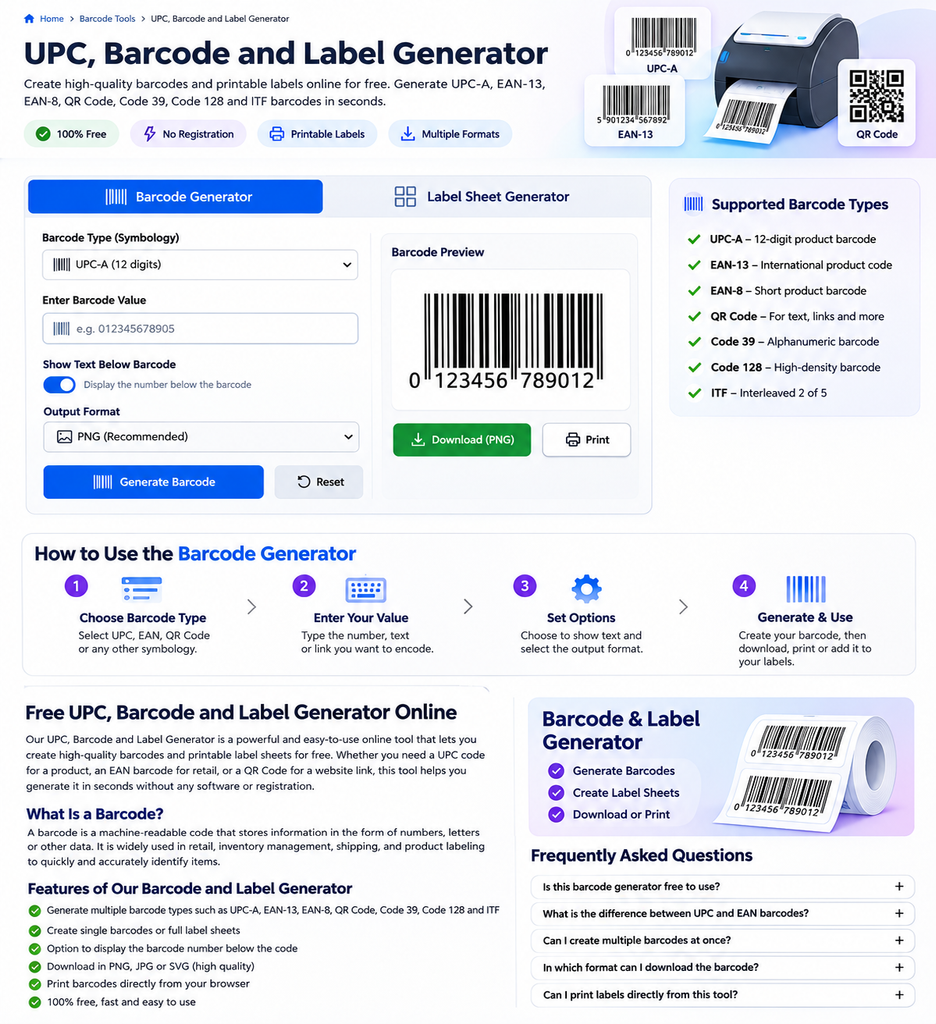
Create and download barcodes online with our free barcode generator. Make UPC-A, EAN-13, EAN-8, QR Code, Code 39, Code 128 and ITF barcodes for products, inventory, labels and business use.
UPC-A: enter 11 digits to calculate the check digit automatically, or enter all 12 digits.
Barcode Preview
How to Use the Barcode Generator
Select UPC-A, EAN, QR Code, Code 39, Code 128 or ITF.
Enter your product number, text or website address.
Choose text visibility and your preferred image format.
Preview your barcode, download the image or print labels.
Free Online Barcode Generator for UPC, EAN and QR Codes
Our free barcode generator makes it easy to create barcode images directly in your browser. Whether you need a product barcode, inventory label, shipping identifier or QR code for a website, this tool helps you generate a code in a few steps. Choose a barcode format, enter your information and generate your result without creating an account.
What Is a Barcode?
A barcode is a machine-readable representation of information. Traditional barcodes use a pattern of dark bars and light spaces to encode data. A barcode scanner reads this pattern and converts it into information that a computer or inventory system can process. QR codes use a two-dimensional pattern and can store different kinds of information, including website links and text.
Barcode Formats You Can Generate
UPC-A Barcode
UPC-A is widely used for retail products, especially in North America. It normally contains 12 digits and is commonly printed on consumer product packaging. Our tool can calculate the final check digit when you enter the first 11 digits. Commercial retail use may require an officially assigned product identifier.
EAN-13 Barcode
EAN-13 is a 13-digit barcode format used internationally for product identification. It is common on retail packaging and helps stores identify products at checkout. Enter the first 12 digits to calculate the check digit, or provide all 13 digits for validation.
EAN-8 Barcode
EAN-8 is a shorter product barcode with eight digits. It is useful when packaging space is limited. Enter seven digits to calculate the check digit or all eight digits to validate the complete number.
QR Code Generator
A QR code is a two-dimensional code that can store a website URL, plain text and other supported data. Customers can scan it with a compatible smartphone camera or QR reader. Use QR codes on flyers, packaging, menus and promotional materials.
Code 39 Barcode
Code 39 is an alphanumeric barcode format used in inventory, manufacturing and internal tracking. It supports uppercase letters, numbers and selected symbols. Lowercase letters are converted to uppercase by this tool.
Code 128 Barcode
Code 128 is a compact, high-density barcode format that can encode letters, numbers and supported ASCII characters. It is often used in logistics, shipping and warehouse operations.
ITF Barcode
Interleaved 2 of 5, commonly called ITF, is a numeric barcode format. It is used in some packaging and distribution environments and requires an even number of digits.
How to Create a Barcode Online
- Select the barcode symbology you need from the format list.
- Enter the number, text or URL you want to encode.
- Choose whether to display the value below the barcode.
- Click Generate Barcode to create a preview.
- Choose PNG for a standard image or SVG for a scalable vector graphic.
- Download your barcode or use the print option.
To create multiple labels, open the Label Sheet Generator tab and enter one value per line. Generate the sheet, review the preview and print the labels. Print a test page on ordinary paper first and check alignment before using adhesive label stock.
Benefits of Using an Online Barcode Maker
- Create barcode images without installing desktop software.
- Generate several common barcode formats in one place.
- Create individual barcodes or batches of labels.
- Download barcode images for documents and packaging layouts.
- Print labels directly from a supported browser.
- Use the tool on desktop, tablet and mobile devices.
- Generate QR codes for links and text.
Barcode Printing Tips
For reliable scanning, use a clear image with sufficient contrast between the bars and background. Avoid stretching a barcode unevenly or placing text and graphics over its quiet zone. Choose a suitable print size and test the printed result with the scanner you intend to use. A barcode that looks correct on screen may not scan reliably if it is printed too small, blurred or distorted.
PNG is convenient for everyday documents and image editing. SVG is a vector format that can be scaled without the same pixelation associated with raster images. Always check the requirements of your retailer, warehouse, shipping provider or inventory software before using a generated barcode commercially.
Frequently Asked Questions
Is this barcode generator free?
Yes. You can use this online barcode generator without registration or a subscription.
Can I create UPC-A and EAN-13 barcodes?
Yes. Select UPC-A or EAN-13 and enter a value that meets the format’s requirements. The tool calculates a missing check digit or validates a supplied one.
Can I generate multiple barcodes at once?
Yes. Open the Label Sheet Generator and enter one barcode value per line. You can generate up to 150 labels in one batch.
Can I download a barcode as PNG or SVG?
Yes. The single barcode generator supports PNG and SVG downloads. QR codes are downloaded as PNG.
Can I print barcode labels?
Yes. Use the label sheet tab to create a printable layout. Check your paper dimensions and printer alignment before printing a full sheet.
Does generating a UPC barcode give my product an official number?
No. This tool creates a barcode image from the value you enter. It does not assign or register an official retail product identifier. Contact GS1 or the relevant authority for product identification requirements.
Can I make a QR code for a website?
Yes. Select QR Code and enter your full website address, including https://.
Is my barcode data uploaded?
The barcode generation happens in your browser using JavaScript libraries. This tool’s code does not send the entered values to our server. External library files are loaded from their CDN providers.
Disclaimer: Barcode format support does not guarantee acceptance by a retailer, shipping provider or regulatory body. Always verify the required barcode standard and product identifier before commercial use.